


The HP DeskJet 2827e Wireless All-in-One Color Inkjet Printer is positioned as the ideal solution for exactly this scenario: the casual home user. It promises simple setup, AI-enabled efficiency, and the cost-saving benefits of the Instant Ink program. But is this compact machine truly the best option for handling your family’s to-do lists, homework, and occasional color photos?
In this honest review, we dive into the core features, mandatory commitments, and performance of the DeskJet 2827e to help you decide if it deserves a spot in your home office.
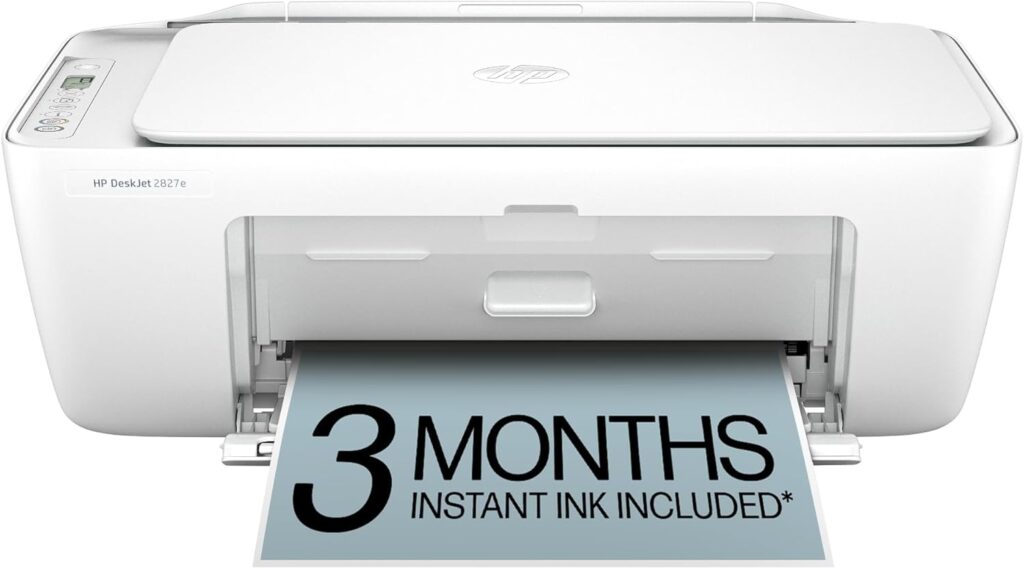
Quick Summary: Key Takeaways for the HP DeskJet 2827e
| Aspect | Summary |
| Price Point | Extremely affordable entry price, often available on sale. |
| Functions | All-in-One: Print (Color), Copy, Scan. (No Fax, No ADF). |
| Speed | Slow to Moderate: Up to 7.5 ppm Black / 5.5 ppm Color. Suitable for light, intermittent use. |
| Ink System | Requires HP+ activation and must use Original HP cartridges for the life of the printer. |
| Best For | Students, budget-conscious families, or anyone printing under 100 pages per month. |
DeskJet 2827e Features: Performance for Light Home Use
The HP DeskJet 2827e is built to be a fuss-free device for the modern, connected home. It combines essential features with a design philosophy centered on simplicity and space-saving.
All-in-One Essentials and Compact Design
At its heart, the 2827e is a reliable All-in-One (AIO) unit, providing standard color printing, flatbed scanning, and copying capabilities. It’s perfect for digitizing a handwritten note or quickly copying an ID.
Perhaps its biggest selling point for home use is its small footprint. The compact design ensures it fits easily on a shelf, desk corner, or console table without dominating the space. Additionally, HP has designed this printer with sustainability in mind, crafting it with at least 60% post-consumer recycled plastic.
Reliable Wireless Connectivity and the HP Smart App
Setting up the printer is primarily done through the HP Smart App (for iOS, Android, PC, and Mac). Users generally find the wireless setup straightforward, allowing you to print from virtually any connected device—your phone, laptop, or tablet—using Wi-Fi, Apple AirPrint, or the HP app itself.
HP highlights the printer’s most reliable Wi-Fi connection, which is designed to automatically detect and resolve connectivity issues, reducing the frustrating “printer offline” errors that plague older models.
AI-Enabled Printing for Perfect Formats
A unique modern feature of the 2827e is its AI-Enabled functionality. This feature is designed to ensure perfectly formatted prints from web pages and emails. HP AI works to automatically remove extraneous content like ads and sidebars, so you only print exactly what you need, reducing wasted paper and ink—a welcome perk for any budget-conscious user.
Understanding HP+ and the Ink Commitment
If you purchase the HP DeskJet 2827e (note the ‘e’ designation), you have the option to activate HP+, which includes a free trial of Instant Ink. This is a crucial feature with major long-term implications for the buyer.
The Instant Ink Advantage
The purchase includes a 3-month Instant Ink trial. This subscription service tracks your ink levels and automatically ships replacement cartridges to your door before you run out, saving you trips to the store and potentially saving up to 50% on ink costs compared to buying standard cartridges. If you print a consistent volume, this can offer great convenience and predictability.
The HP+ Restriction
By activating HP+, you are making a commitment that the printer will only work with Original HP cartridges that contain HP chips or electronic circuitry. The printer uses “dynamic security” and firmware updates to block non-HP or third-party ink.
What This Means for You: If you are a buyer who prefers the flexibility of choosing different brands of cartridges or using refilled/remanufactured ink to save money outside of a subscription, this printer is not for you. It requires a continuous choice between using the HP Instant Ink service or purchasing full-priced Original HP cartridges exclusively.
Balanced Assessment: Where the 2827e Excels and Falls Short
This printer offers compelling value at its price point, but it’s important to weigh its trade-offs.
Advantages
- Exceptional Value: One of the most affordable AIO printers on the market.
- Simple Mobile Printing: The HP Smart App makes printing from phones and tablets seamless.
- Instant Ink Eligibility: Excellent cost control and convenience for regular, low-volume users who subscribe.
- Compact & Sustainable: Fits easily in small spaces and is environmentally constructed (60% recycled plastic).
- Easy Setup: Highly praised by users for its straightforward, app-guided installation.
Trade-Offs
- Slow Print Speeds: 7.5 ppm (black) and 5.5 ppm (color) means it’s inadequate for large, time-sensitive print jobs.
- Manual Duplexing Only: You must manually flip the pages to print on both sides.
- No ADF: Scanning and copying multi-page documents is cumbersome, as it lacks an Automatic Document Feeder.
- Ink Restriction: The HP+ commitment locks you into using only Original HP cartridges, removing the freedom to shop for cheaper third-party ink alternatives.
- 2.4GHz Wi-Fi Only: Will not connect to the faster 5GHz Wi-Fi band used by many newer home networks.
Who Should Buy the HP DeskJet 2827e?
The HP DeskJet 2827e is tailored for the very light home user or student.
- You Should Buy This If:
- You primarily print 50-100 pages a month (school reports, recipes, light documents).
- You are comfortable using the HP Smart App for all your printing needs.
- You are happy subscribing to the HP Instant Ink program for automated ink delivery and cost savings.
- You need a small, unobtrusive device that can handle basic copy and scan functions.
- You Should Look Elsewhere If:
- You print hundreds of pages per month.
- You need fast printing speeds or automatic two-sided (duplex) printing.
- You require an Automatic Document Feeder (ADF) for scanning stacks of documents.
- You prefer using non-HP ink cartridges to manage costs without a subscription.
Our Final Take on the HP DeskJet 2827e
The HP DeskJet 2827e delivers exactly what its budget price suggests: essential All-in-One functionality in a compact, highly connected package. It’s an entry-level powerhouse for light, domestic use. Just remember that the convenience of the low price and the Instant Ink trial comes with a trade-off: you are committing to HP’s ecosystem for the life of the machine. If that commitment doesn’t bother you, the 2827e is a reliable, budget-friendly choice.
👉 Check the latest price and deals for the HP DeskJet 2827e on Amazon.
We’d love to hear from you! If you have any questions, feedback, or inquiries, please feel free to reach out through the form below or contact us directly at [email protected].
We appreciate your interest and will get back to you as soon as possible! Thank you for reaching out.
